
Bookings
Commission-free restaurant bookings: compare what you will pay for and use
A fixed fee may reduce booking costs, but you also need to check availability, reminders and where customers come from. Compare the full cost and test the booking journey before changing systems.
 Isaac Lacosta11 min read

In this article
In 30 seconds
- Commission-free does not mean cost-free. Review subscriptions, setup, messages, payments and cancellation terms. Distinguish software that manages bookings from a marketplace that may bring in new customers.
- Calculate using guests who actually attended. If your contract charges per person, a booking for four creates four billable units. Cross-check statements against cancellations, no-shows and the source of each booking.
- Test a service before migrating. Set up sittings, tables, duration and capacity, then make and cancel a booking. The new system needs to work for your team and preserve future reservations.
Key points: what a booking through a portal costs
A booking portal charges the restaurant a commission for every seated diner who arrives through its app. TheFork, for example, describes it on its website as a percentage of the average spend per customer, without publishing the figure. On top of that comes the discount on promotions, which the restaurant covers.
A commission-free system works the other way round: you pay a flat fee a month, whether 100 bookings come in or 400. The customer books from your Google listing, your website or your Instagram, and their details stay with you.
- Commission per diner on portals: the figure is in your contract; ask for it in writing.
- Flat fee on systems of your own: from 0 to 299 € a month before VAT in the published prices in the comparison below, as of September 2026.
- The "Reserve a table" button on Google Maps is switched on by a Reserve with Google provider; you can also add your own booking link to your listing.
- You can run alongside the portal during the transition. You don’t have to choose on day one.
What a commission-free booking system is (and what it isn’t)
A booking system lets you receive and organise reservations without a commission per booking or guest on the channels covered by your contract. There may be subscription fees, setup costs or charges for additional features. Check exactly what “commission-free” covers in the proposal.
A booking manager and a marketplace serve different purposes. The former organises availability and reservations from connected channels; the latter may also bring demand from its own audience. Some providers combine these functions, so compare each channel separately.
A free plan can be enough for some operations, but check its specific limits. Review reservations, users, reminders, payments and Google integration in the provider’s current documentation. Price alone does not tell you which features are included.
What you really pay: the monthly sum
Do the sum with your own numbers. You need three figures: bookings a day that come in through the portal, diners per booking and the commission per diner in your contract. The example uses a hypothetical commission of 2 € so that you can swap in your own.
Hypothetical example: eight bookings a day, 2.5 guests per booking, a €2 commission per guest and 26 days produce a monthly commission of €1,040. This excludes other charges or promotions. Compare it with the contribution from those visits and the cost of an alternative that covers your needs.
Separate what you know about a booking’s origin from what you assume. Someone searching for your name does not prove they would have booked through another channel. Record how guests found you where possible and assess whether the provider brings new customers or converts demand that already existed.
Swipe to compare →
| Portal bookings a day | Diners a day (×2.5) | Commission a day | Commission a month | Equivalent revenue at €13.50 |
|---|---|---|---|---|
| 4 | 10 | 20 € | 520 € | 38 |
| 8 | 20 | 40 € | 1,040 € | 77 |
| 12 | 30 | 60 € | 1,560 € | 115 |
| 20 | 50 | 100 € | 2,600 € | 192 |
Marketplace or your own system: when each one pays off
A marketplace pays off when you have empty tables you wouldn’t fill any other way: a Tuesday in January, a dining room for 80 with 30 seats taken, a new place in a tourist area with no reviews. There, an app with lots of users is a real lever.
It doesn’t pay off when you fill up at lunchtime anyway, when the customers who arrive through the portal already knew you or when the discount eats the margin. A bar with a 13.50 € set menu can’t take 30 % off and pay commission per head.
The decision isn’t either-or. Many restaurants keep the portal for its app and use a system of their own for Google, their website and Instagram, blocking time slots in one and the other so tables aren’t double-booked.
What a booking system of your own needs to have
The essentials, in order of importance. A system without a button on Google is a pretty notebook.
- A "Reserve a table" button on your Google Maps listing and in Search (Reserve with Google).
- A booking link for your website, your Instagram and your WhatsApp. The same one in all three places.
- Instant confirmation and a reminder the day before, by WhatsApp or SMS.
- Easy cancellation for the customer, in one tap.
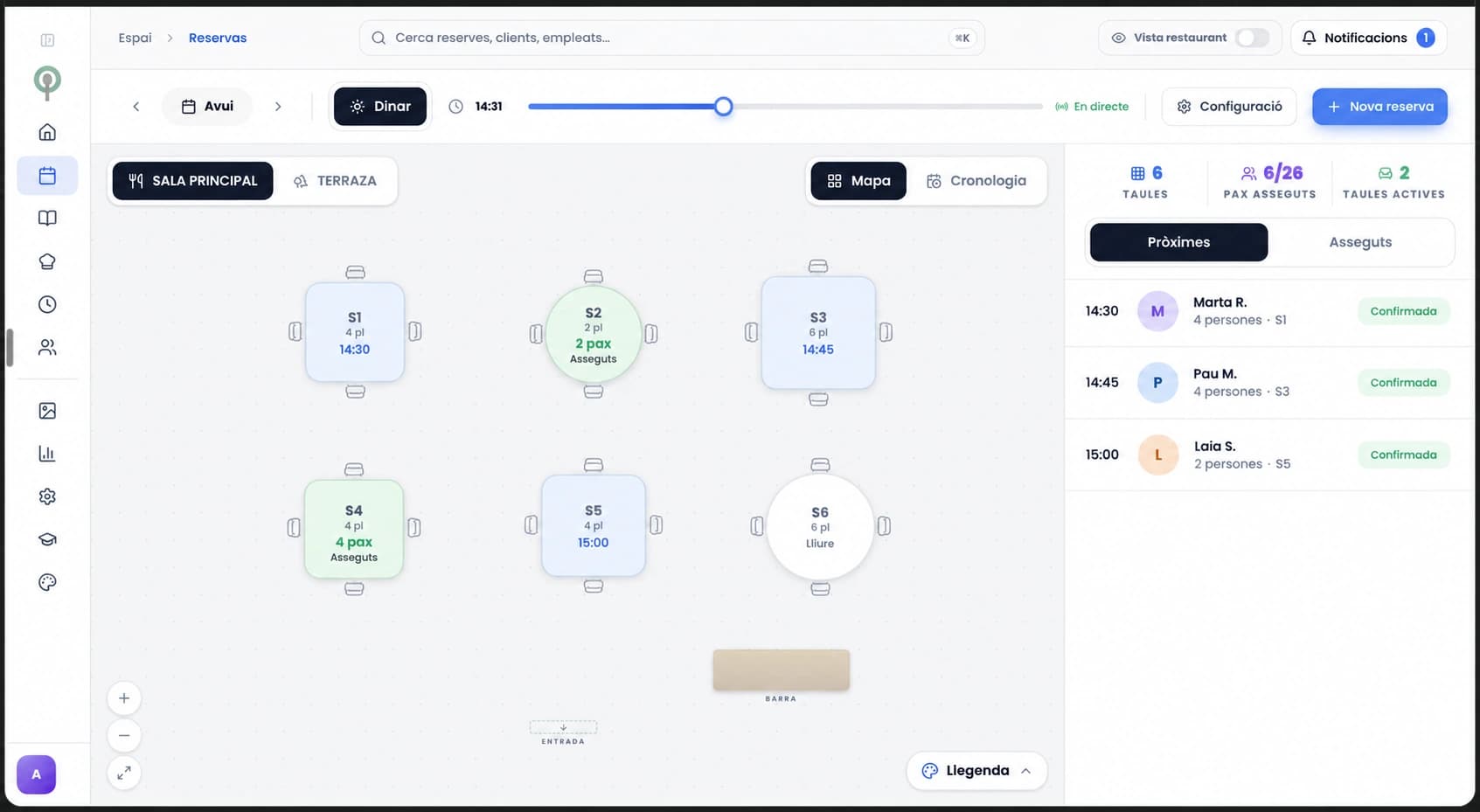
- Floor management: sittings, capacity per time slot and tables.
- An automatic waiting list when a time slot fills up.
- An optional card guarantee for groups and special dates.
- A bookings diary on your phone, so you can check it from the kitchen or from home.
- Customer history: how many times they have been, allergies, favourite table.
- Export of your data in an ordinary file. If you leave, you take it with you.
Comparison: 8 booking systems in Spain
Prices taken from each company’s website on 19 September 2026, before VAT. They change often; check each website before you sign. Where the price isn’t public, we say so; if a feature isn’t listed on their website, we put “No”.
On 6 October 2026, we removed QuickSit from this table because its website announces its closure. The remaining prices retain the review date given above. Check the terms of the specific plan before comparing quotes.
Swipe to compare →
| System | Price per month | Commission per diner | Reserve with Google | WhatsApp reminder | Menu and Google Maps included |
|---|---|---|---|---|---|
| TheFork Manager | Not published (Visibility, Performance, Enterprise plans) | Yes on bookings from its app and partners: % of the average spend, not published | Yes | No | No |
| CoverManager | Not published (Standard, Premium and Performance plans) | 0 € | Yes (Google partner list) | WhatsApp assistant as an add-on | No |
| Restoo | 39-249 € | 0 € | Google button on all plans | No | No |
| Zenchef | Not published | 0 €; fee of 2 to 6 % per card payment | Yes | Email or SMS; WhatsApp no | No |
| Tableo | Free up to 100 diners/month; 59-299 € (from 49.17 € on annual billing) | 0 € | Yes, on the free plan too | SMS and WhatsApp notifications charged per use | No |
| Kitking | 0-59 € (caps from 50 to 1,000 bookings/month) | 0 € | Google button on Pro, according to its website | WhatsApp templates on Pro | QR menu on Pro; Google Maps no |
| Carbonara | Free up to 50 parties/month; paid plans from 9.99 to 56.99 a month (its website shows them in dollars) | 0 € per booking | Yes (Google partner list) | SMS/WhatsApp charged per use | No |
| Menuveo | From €59.99/month + VAT | 0 € | Yes, official partner | Yes | Yes: menu, daily set menu, Google Maps and website |
No-shows: how to reduce them without scaring customers off
A no-show is the booked table that never turns up. In a bar with 40 covers, a table of six that fails on a Saturday is 15 % of the room. The system doesn’t eliminate it, but it has three tools to reduce it.
The first is the automatic reminder the day before with a link to cancel in one tap: if the no-show is a case of forgetting, the reminder prevents it, and if cancelling is easy, people cancel. The second is the waiting list, which turns a cancellation at 12:00 into an occupied table at 14:00.
The third is the card guarantee for groups and special dates. For a table of two on a Tuesday it is a nuisance; make it optional and per time slot. The manual confirmation call takes up front-of-house time and people don’t always pick up.
Bookings by WhatsApp: yes, but with a system behind them
Many restaurants take bookings by WhatsApp and write them down in a notebook. It works until two get lost on a Saturday or the person who replies is on holiday.
The sensible approach is for WhatsApp to lead to the booking link, or for whoever answers to enter the booking in the system from the same chat. Either way the customer gets a confirmation and a reminder, through whichever channel your system has: WhatsApp, SMS or email.
How to change system without losing bookings
First, export the future bookings and the customers from your current system. Second, set up the new one with your real floor plan and import the bookings; make three test bookings and check that the confirmation arrives.
Third, change the booking link on Google, your website and Instagram on the same day. If the new provider is a Google partner, Google states that it appears on your listing within a week. Keep the old system for two weeks for what is already booked.
If you are on a marketplace, you can stay on it for its app and use your own system for direct bookings. Once you can see where each booking comes from, you decide.
During migration, keep a list of future bookings with the date, sitting, party size and outstanding requests. Check which data you can transfer and under what conditions. Make the switch between services and assign someone to review phone, website and Google bookings so two calendars do not show different availability.
How Menuveo does it
With Menuveo we go through tables, sittings and capacity with you, and how to split availability between channels to avoid duplicates. The button on your Google listing and your website lead to the same diary, with no minimum term and with your customer database exportable.
Checklist before you sign up to a booking system
Ten questions for the demo. The answers should be in writing in the contract or on their pricing page.
- Does it charge anything per booking, per diner or to the customer? Get it in writing.
- Is it on the public Reserve with Google partner list? Check it yourself.
- Does it send a confirmation and a reminder by WhatsApp? How much does each message cost?
- Can I export bookings and customers in an ordinary file whenever I want?
- Is there a minimum term? How much notice do they have to give before raising the price?
- Are the waiting list and the card guarantee included or are they a separate module?
- Can I view and manage it from a phone, without a computer?
- What happens on a Saturday at 21:00 if something fails? Who answers?
- Does it integrate with my POS (the TPV, your till system) or at least not force me to change it?
- What else does it include for the same price: menu, daily set menu, Google listing, website?
Flat fee: what it means and what to look for in the contract
A flat fee means you pay the same every month, however many bookings come in. But it doesn’t always mean "no variable costs". Look at three lines in the contract.
Messages: some systems charge for SMS per unit, and with 300 bookings a month that is a variable cost. Modules: the waiting list, the card guarantee or the CRM can be extras that turn the 39 € plan into 120 €.
And what else is included. A standalone booking system is 40 or 100 € a month. If for a little more it includes your menu, the daily set menu published every morning and a well-kept Google listing, you are comparing a single piece with a complete system.
How Menuveo does it
Menuveo connects bookings, website, Google Maps, menu and daily set menu. Public price: from €59.99/month + VAT, no lock-in. You can see how restaurants work with Menuveo in the case studies of Bar APZ, El 9 Suprem and La Fábrica.
Frequently asked questions
It depends on the sittings, capacity and channels you need to manage. For a neighbourhood bar or restaurant that also wants to show up on Google Maps, Menuveo combines commission-free bookings with a Google button, your listing, menu and daily set menu: from €59.99/month + VAT, no lock-in. Try a booking and a cancellation with your dining room set up and get the full cost in writing.
Some providers offer free plans under their current terms and limits. Compare what they count, such as bookings, guests or groups, and check reminders, payments, exports and Google integration in the specific plan.
Yes. A portal can charge the restaurant a commission per diner; it is a contract between businesses. And a restaurant can ask the customer for a card guarantee if it tells them clearly before they confirm.
CoverManager doesn’t publish the price of its Standard, Premium and Performance plans; its website talks about a fixed monthly fee per venue, with no commission per booking and no minimum term. Ask for the proposal in writing after the demo.
Yes. TheFork for its app, your own system for Google, your website and Instagram, blocking time slots in one or the other. After two months you will see what share of the bookings were people searching for you by name.
The replacement for the notebook: an app with every booking by sitting and table, synced with the Google button and your website, that sends a confirmation and a reminder and keeps each customer’s history.
Setting up the floor plan takes one afternoon and importing bookings takes another. According to Google, the provider appears on your listing within a week. In one or two weeks everything is up and running.
A serious system lets you export bookings and customers in an ordinary file at any time. Look for it in the contract before you sign: they are your customers.